Executive Summary
At the AI Engineer Code Summit in New York City, Anthropic shared key insights into the Claude Agents SDK that reshape how effective AI agents are built in practice. By exposing the same agent harness that powers Claude Code, the SDK highlights a shift away from prompt-centric approaches toward more structured, reliable agent architectures.
These learnings reflect a growing challenge many teams are encountering in practice: increasing model capability and code generation speed without losing control, auditability, or reliability. This post distills the core technical takeaways and explains why the infrastructure around the model—the agent harness—is just as critical as the model itself.
The full workshop recording from the summit is available on YouTube.
In this blog post, we dive into our main learnings.
What is an Agent Harness?
To understand the Claude Agents SDK, we first need to understand the concept of an Agent Harness (also called a "scaffold"). Here, we highly recommend Philipp Schmid's blog post on this topic, which we drew inspiration from.
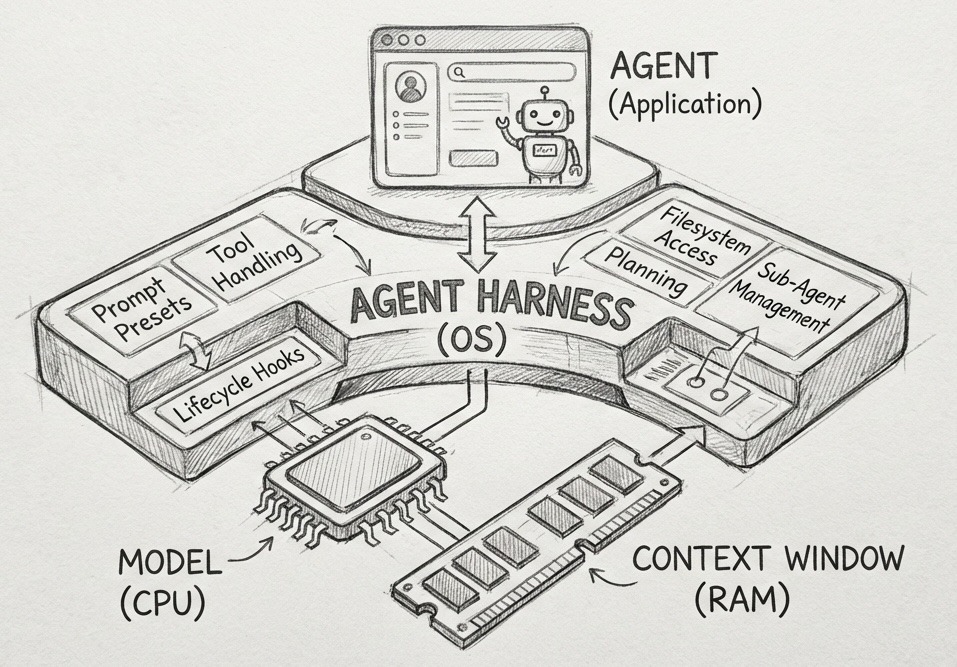
It helps to draw an equivalent to how a computer works.
- The Model can be seen as the CPU. It provides the raw processing power, taking text as input and producing text as output. Examples are Claude Opus 4.5, Gemini, GPT-5 and so on.
- The Context Window can be seen as the RAM. It is the limited, volatile working memory the model can use. This is often only around 200k tokens, of which about 60 to 80k can effectively be used before the model starts degrading in performance. Since the context window is limited, it's pretty precious what we put into it.
- The Harness is the Operating System. It curates the context (determines what to put in the "RAM"), handles the "boot" sequence by setting prompts and hooks, and provides standard drivers through tool descriptions and skills - more on that later.
- The Agent can be seen as the Application. It is the specific user logic running on top of the OS.
In practice, the harness acts as the coordinating layer for perception, memory, and reasoning, enabling orchestrated workflows rather than relying on prompt engineering alone.
If we would apply this to Claude Code, then:
- The model is Claude Opus 4.5, Sonnet 4.5 or Haiku 4.5
- The context window is 200k tokens (of which around 60-80k in practice)
- The harness is the collection of CLAUDE.md, tools such as grep, search and MCP, Skills, subagents, hooks and more.
- The agent depends on what we build with it! Some use cases are shown at the bottom of this blog post.
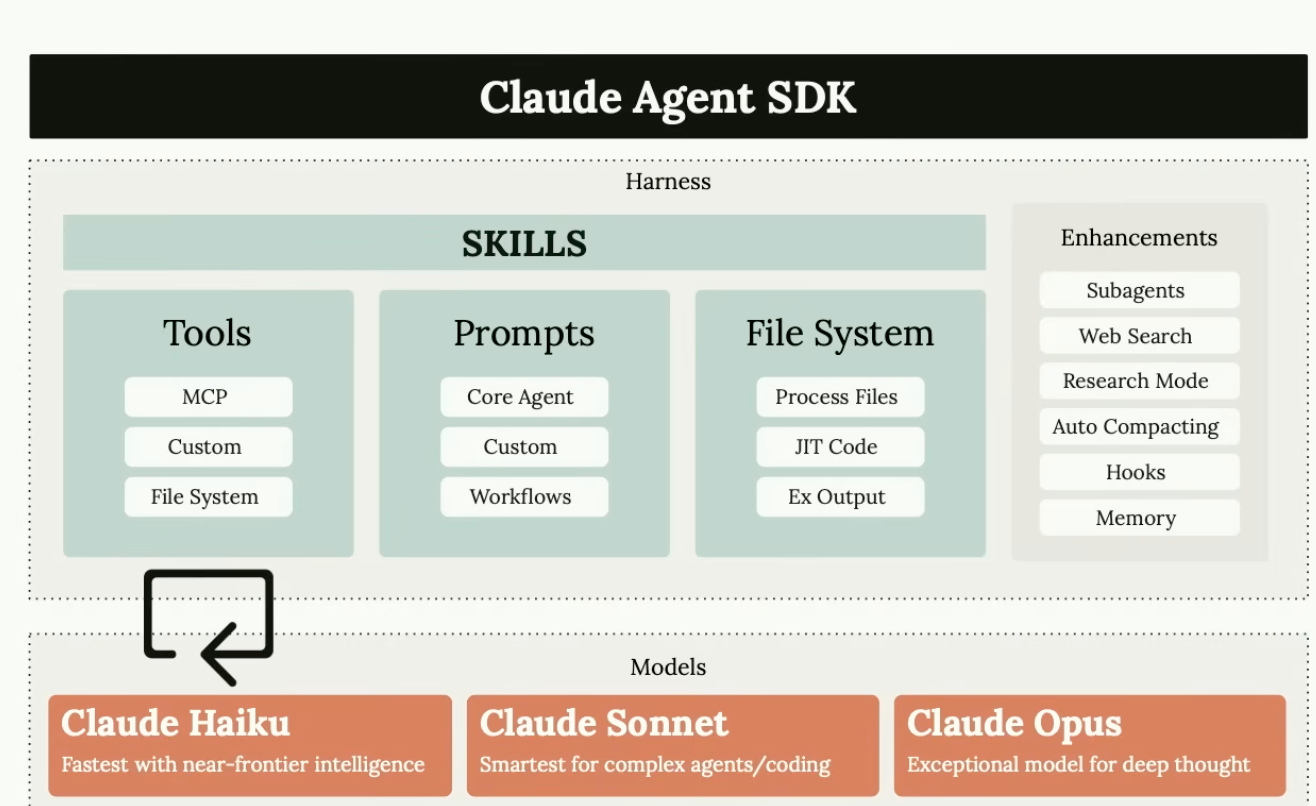
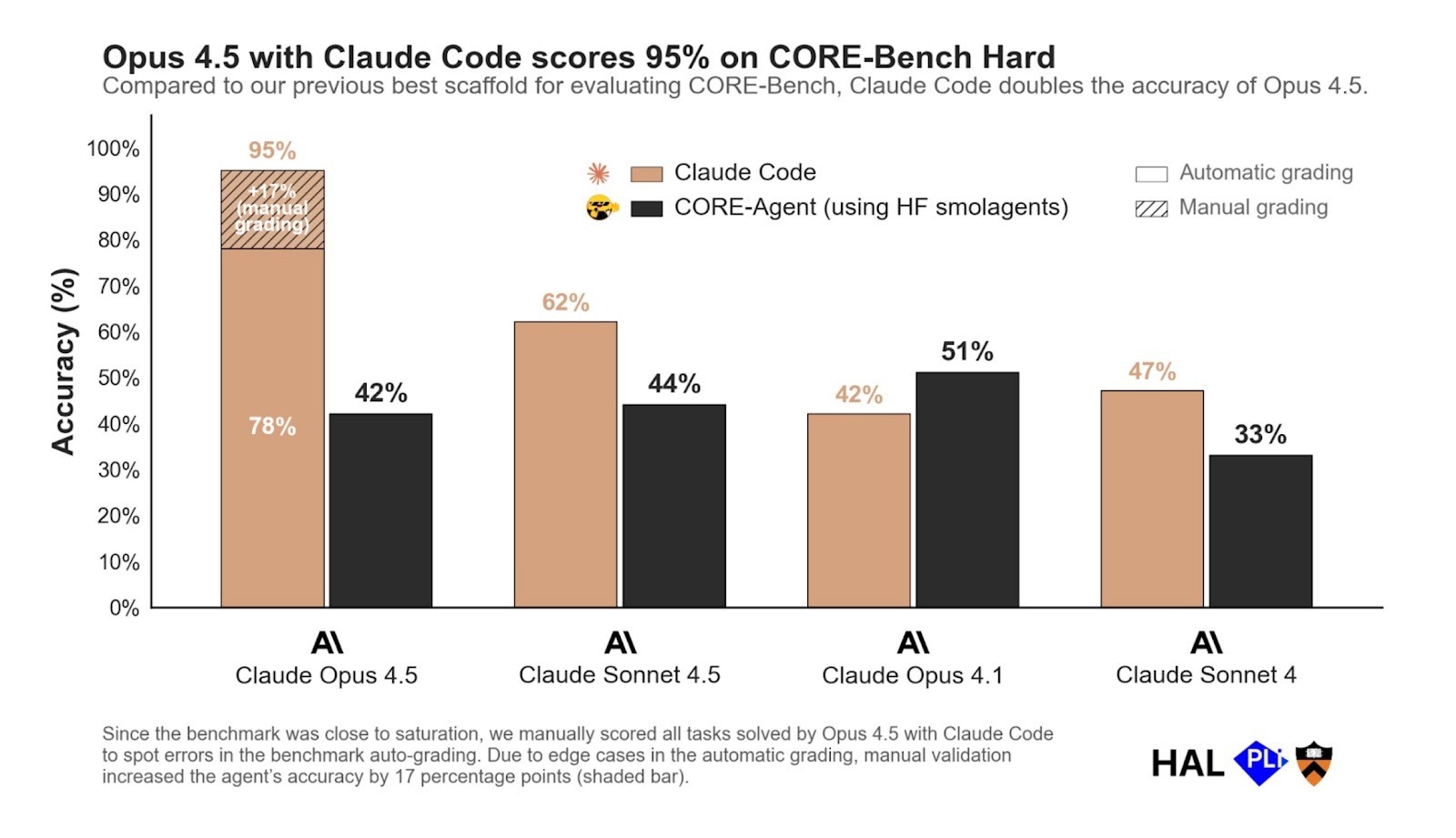
The important insight here is that the harness is just as important as the model itself. On the CORE benchmark (which tests agents' ability to reproduce scientific results), the same Opus 4.5 model scored 78% with Claude Code's harness but only 42% with Smolagents. That's a massive difference in performance! These results highlight how capability evaluations on multi-step tasks are deeply influenced by harness design, not just the underlying model. This is the main reason why people love Claude Code so much, as it gets the most performance out of the model.
The Claude Agents SDK: Enterprise-Grade Agent Infrastructure
The Claude Agents SDK packages up the powerful harness from Claude Code and makes it available for developers to build their own applications on top of it. The SDK is available in both Python and Typescript.
An important point here is that it's not just for coding agents! You can build any type of application on top of it, such as finance agents, a customer service agent, or a data engineer agent.
Anthropic built it because they have a pretty opinionated take on how to build effective AI agents which we'll discuss below, and they were building their own agents on top of the SDK. Hence they want people to benefit from the same harness that powers Claude Code.
Anthropic's Best Practices for Building Agents
1. Bash is all you need
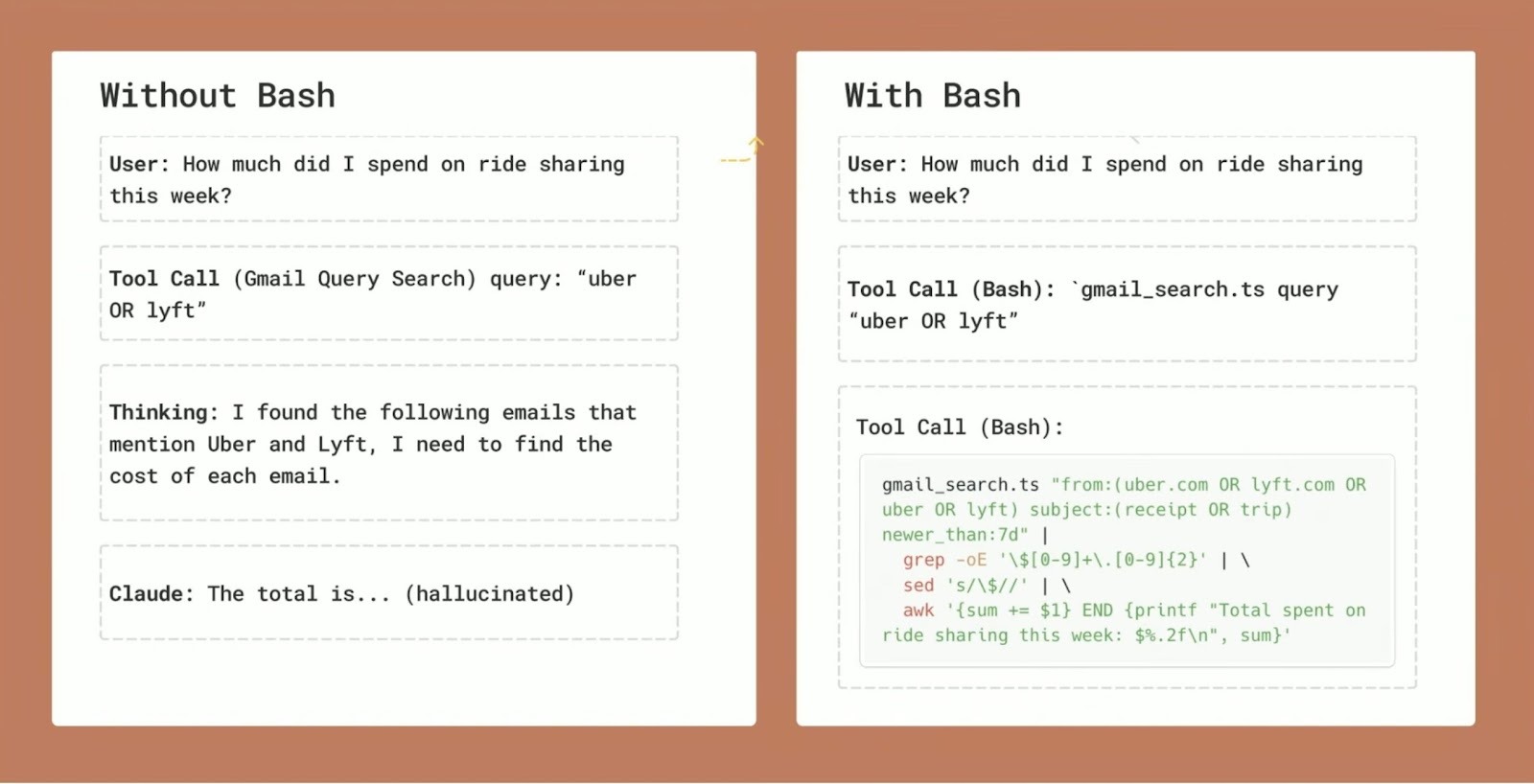
Anthropic says "bash is all you need" for agents. It's the thing that makes Claude Code so good. Bash (the terminal app on a Macbook) is oftentimes the most effective tool an agent can use to do any work. Instead of creating separate Search, Lint, and Execute tools, often with long descriptions, Claude can use low-level Unix primitives like grep, tail, and npm run lint.
Bash is composible, as multiple tool calls can be chained together using the pipe operator ('|'). The agent can also store the results of tool calls to a file using >, making them searchable. Moreover, it can use many existing CLIs such as ffmpeg when working with audio or video, or gh when working with Github.
This approach is simple and more powerful than creating dozens of specialized tools, whose descriptions and results consume a lot of tokens of the limited context window. It reduces tool-call overhead while improving tool utilization efficiency across a wide range of data formats.
Take the example of querying an email API. Rather than calling a tool of an email MCP server with limited flexibility, the agent can use Bash to perform SQL queries, search the results, and write them to a file. Note that all those tool calls can be performed with a single line of commands, by chaining them together using the pipe operator.
2. Choosing Between Tools, Bash, and Code Generation
Of course, Bash should not be used at all times. Tools (via MCP or not) and code generation (writing and storing reusable scripts) can be useful too. Each approach has its pros and cons, which Anthropic summarizes below:
Tools:
- Pros: Highly structured, highly reliable
- Cons: High context usage, not composable
Bash:
- Pros: Composable, static scripts, low context usage
- Cons: Longer discovery time, slightly lower call rate
Code Gen:
- Pros: Highly composable, dynamic scripts
- Cons: Needs linting & possibly compilation, careful API design
They recommend using them for the following use cases:
- Tools should be used for atomic actions executed in sequence (such as writing files, sending emails). Another example where tools make the most sense is web search, which is an atomic action that agents often perform. Various companies provide MCP servers with web search tools optimized for agents, such as Exa, Brave and Parallel.
- Bash should be used for composable actions built from simple building blocks (such as searching databases, memory operations, linting). This is much more efficient than heavy MCP servers. For example, the Github CLI achieves the same functionality as the 15k token Github MCP server with far fewer tokens.
- Code Generation should be used for highly dynamic, flexible logic (such as data analysis, deep research, pattern learning). When converting CSV data to visual plots, writing a Python script with libraries like Pandas and Matplotlib is the appropriate solution that can be saved, linted, and reused.
3. The Power of the Filesystem
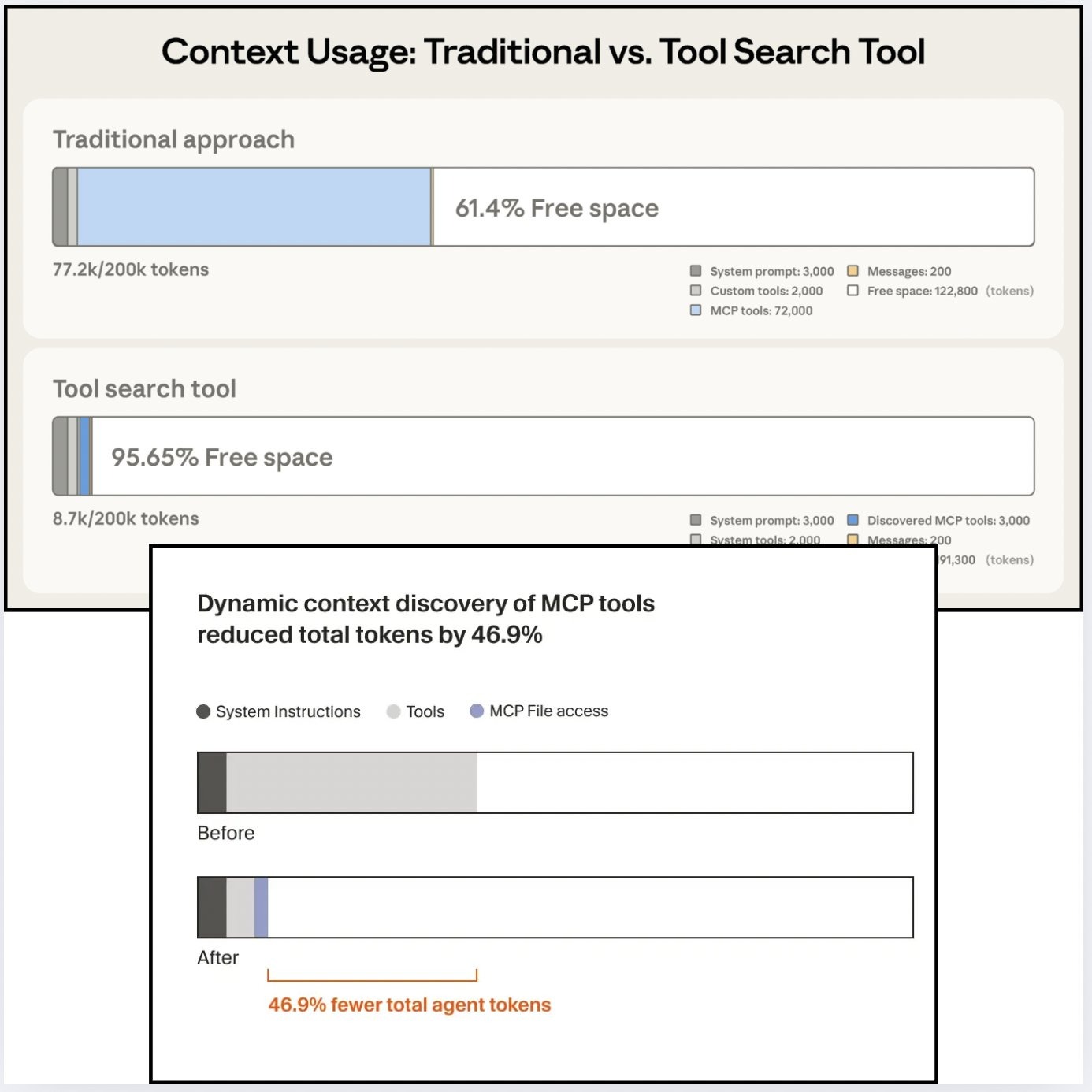
Anthropic realized (around the same time as Cursor) that loading all tool descriptions of an MCP server in the system prompt is not the best idea, as in that way you already waste a lot of tokens of the context window of the LLM, before the agent starts doing any work. For example, the Github MCP server includes 38 tools which would take up 15k tokens of tool descriptions.
Hence, a better idea could be to store information the agent can use on the filesystem, and only let it retrieve that information when needed based on the incoming request, "just-in-time". This way, the filesystem enables "dynamic context discovery": tokens only get loaded into the context window when needed.
Some examples of this:
- Anthropic introduced Skills, which are simply markdown files and scripts stored on the filesystem. The agent only sees the short names and descriptions of each skill, and can read them when needed.
- Anthropic introduced a Tool search tool, which is just a tool to semantically search all the available tools in the filesystem.
- Cursor now by default writes all MCP tool descriptions to the filesystem. The agent only sees the tool names. It can read the full tool descriptions when needed.
- Cursor writes all conversations and terminal outputs to the filesystem, allowing agents to dynamically retrieve them when needed.
4. Always Verify Your Work
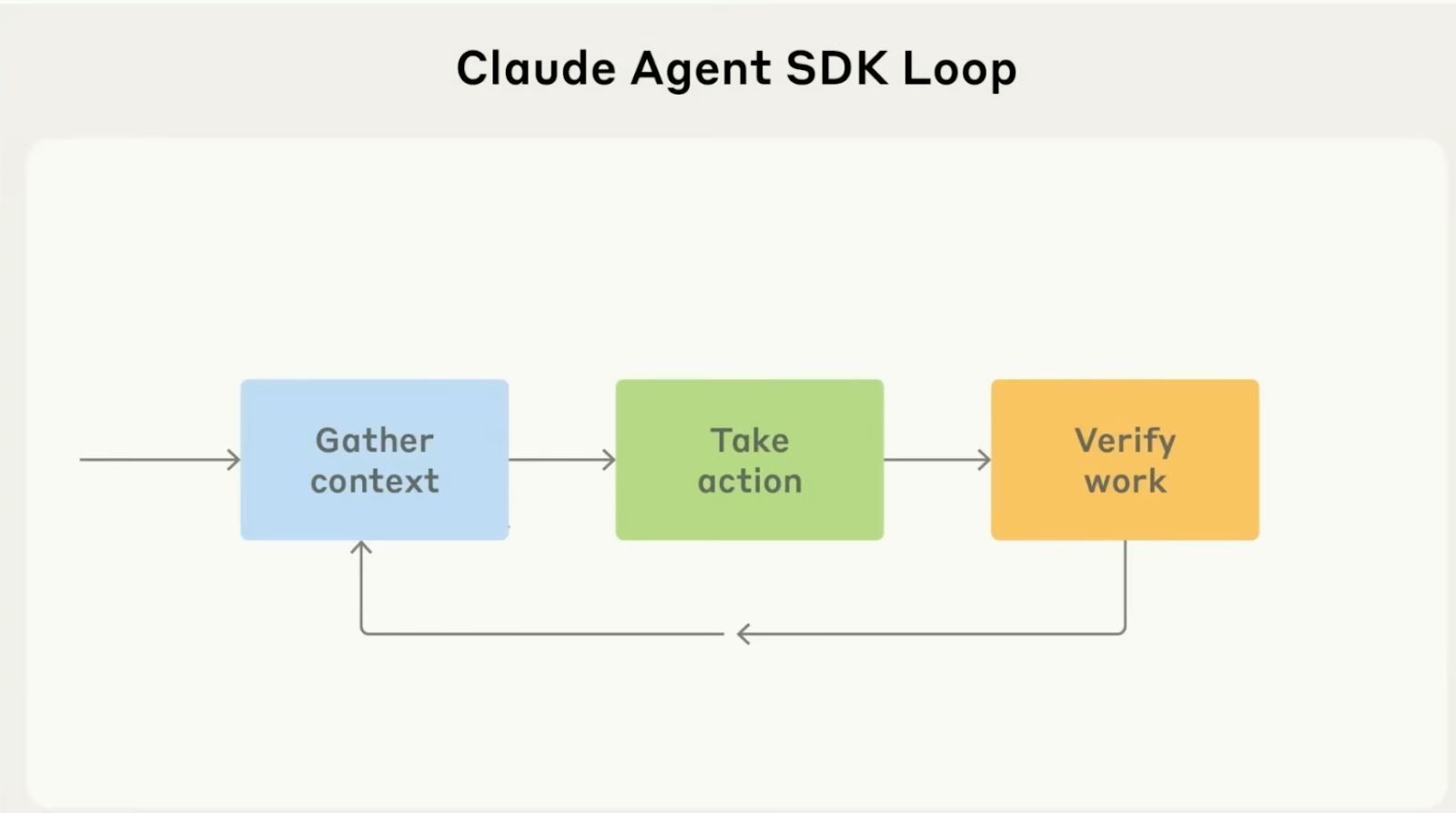
Anthropic heavily recommends 3 steps for an effective agent loop:
- Gathering context, e.g. grep, reading files, semantic search
- Taking action, can be via Bash, tools or code generation
- Verifying the work, e.g. linting code, compiling code, citations in case of RAG
If the task can be verified, it's a great candidate for building an agent for it.
Real-World Use Cases
The community is already building impressive applications. Some examples below:
- Ad Generation: Creating Hermes ads using Bash and generative AI APIs like ElevenLabs and Veo 3
- Daily Brief: Connecting Claude Code to iMessage, WhatsApp, Gmail, and Google Calendar using Skills that read local data with Bash and SQL commands
- AI Deadlines: A web app using separate Modal containers where each agent scrapes conference deadlines and opens PRs on Github
- Automated Customer Service: Using Claude to navigate Chrome and handle tasks like shoe returns through customer service workflows
Conclusion
The Claude Agents SDK represents a significant step forward in making enterprise-grade agent capabilities accessible to developers. By understanding the power of Bash, when to use tools versus bash versus code generation, and leveraging the power of the filesystem for dynamic context discovery, you can build agents that are both powerful and efficient.
The key insight is that the harness - the infrastructure around the model - is just as important as the model itself. With the Claude Agents SDK, you now have access to the same battle-tested infrastructure that powers Claude Code.